A robots.txt copied from an old template
One Disallow line copied from an old template or guide is enough to shut out ChatGPT search, Claude or Perplexity. Once the site is live, nobody reads that file again.
Free WordPress plugin
See which AI bots can reach your site - ChatGPT, Claude, Perplexity, Google AI and more - and why the others are blocked.
Free, no account, no limits. It only reads your settings and files; every fix is up to you.
A robots.txt line, an SEO plugin switch, a Cloudflare setting or a firewall rule is enough to keep a site out of ChatGPT search, Claude, Perplexity and Google's AI answers. None of it shows up in your analytics.
One Disallow line copied from an old template or guide is enough to shut out ChatGPT search, Claude or Perplexity. Once the site is live, nobody reads that file again.
Since July 2025, Cloudflare blocks AI crawlers by default on new sites and can add AI rules to your robots.txt at the edge. WordPress never sees either one.
A security rule written to stop spam bots often matches any user agent with "bot" in its name. GPTBot, ClaudeBot and PerplexityBot get turned away with the spammers.
Including rules your CDN adds at the edge, such as Cloudflare's managed robots.txt.
A physical file, WordPress itself, or a plugin such as Yoast SEO, Rank Math or All in One SEO.
The checker loads your homepage from outside as each AI bot and compares the result with a normal browser and a test Googlebot, so a generic bot challenge is not mistaken for an AI block.
Limits that stop crawlers partway through your site.
Such as "Discourage search engines", plus noindex tags on your homepage.
Rules that target bots by name.
Plugins that can block bots, such as Wordfence or All-In-One Security.
The plugin opens its page for you under Tools > AI Bot Access.
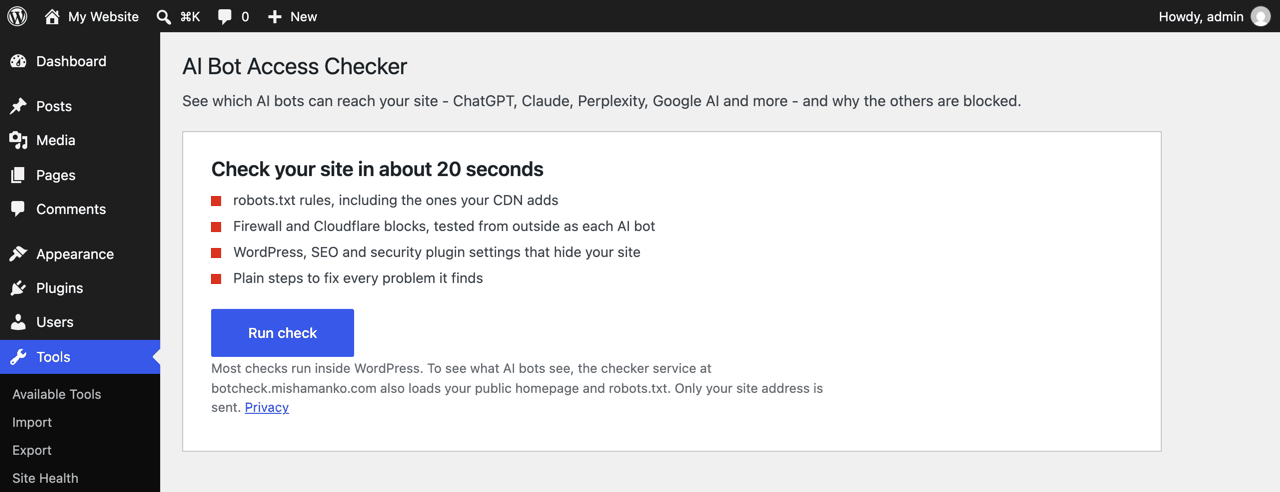
Click "Run check". In about 20 seconds it tests your robots.txt and firewall for every AI search and training bot.
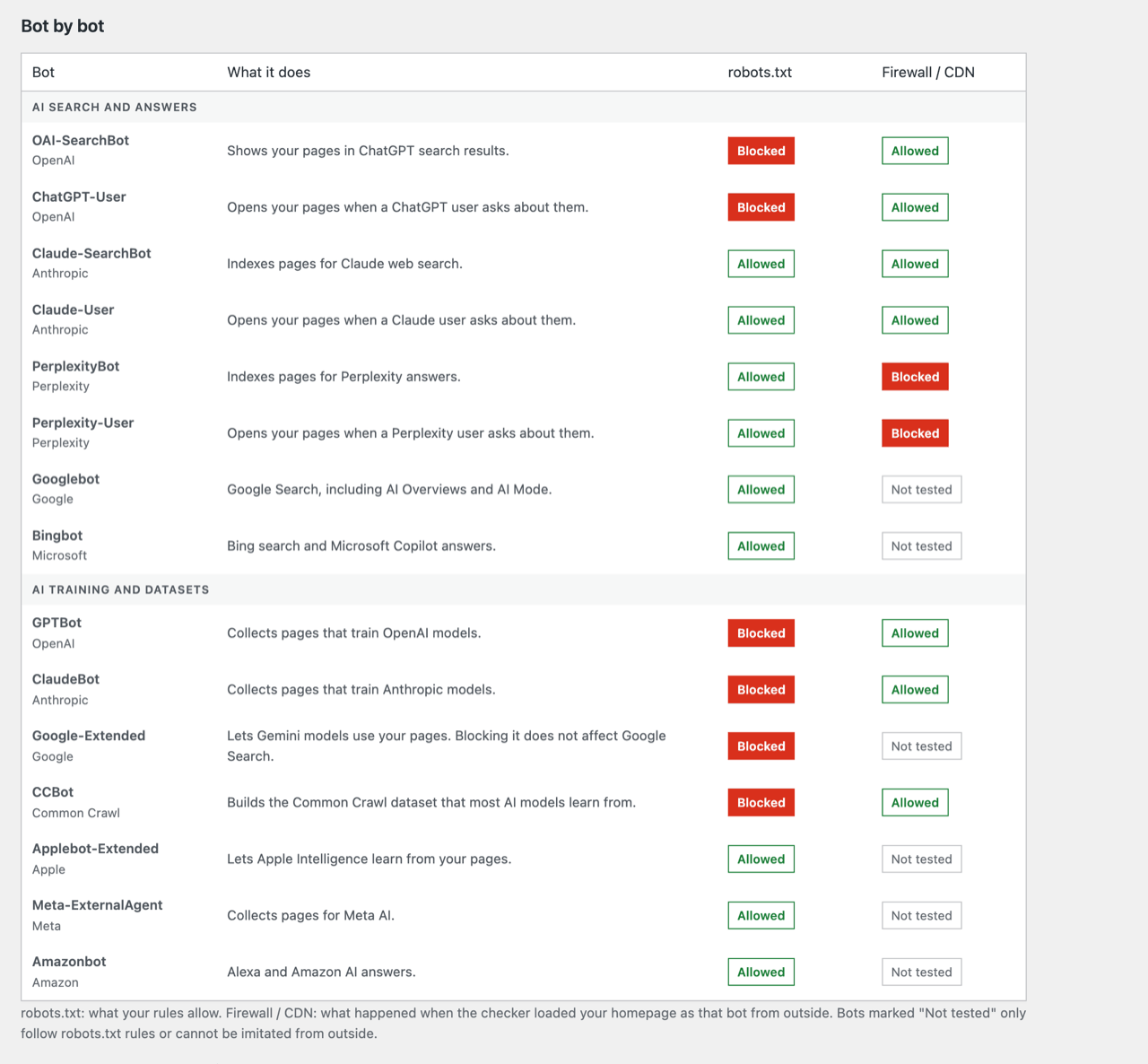
Each problem says where the block comes from and gives plain steps to fix it yourself.
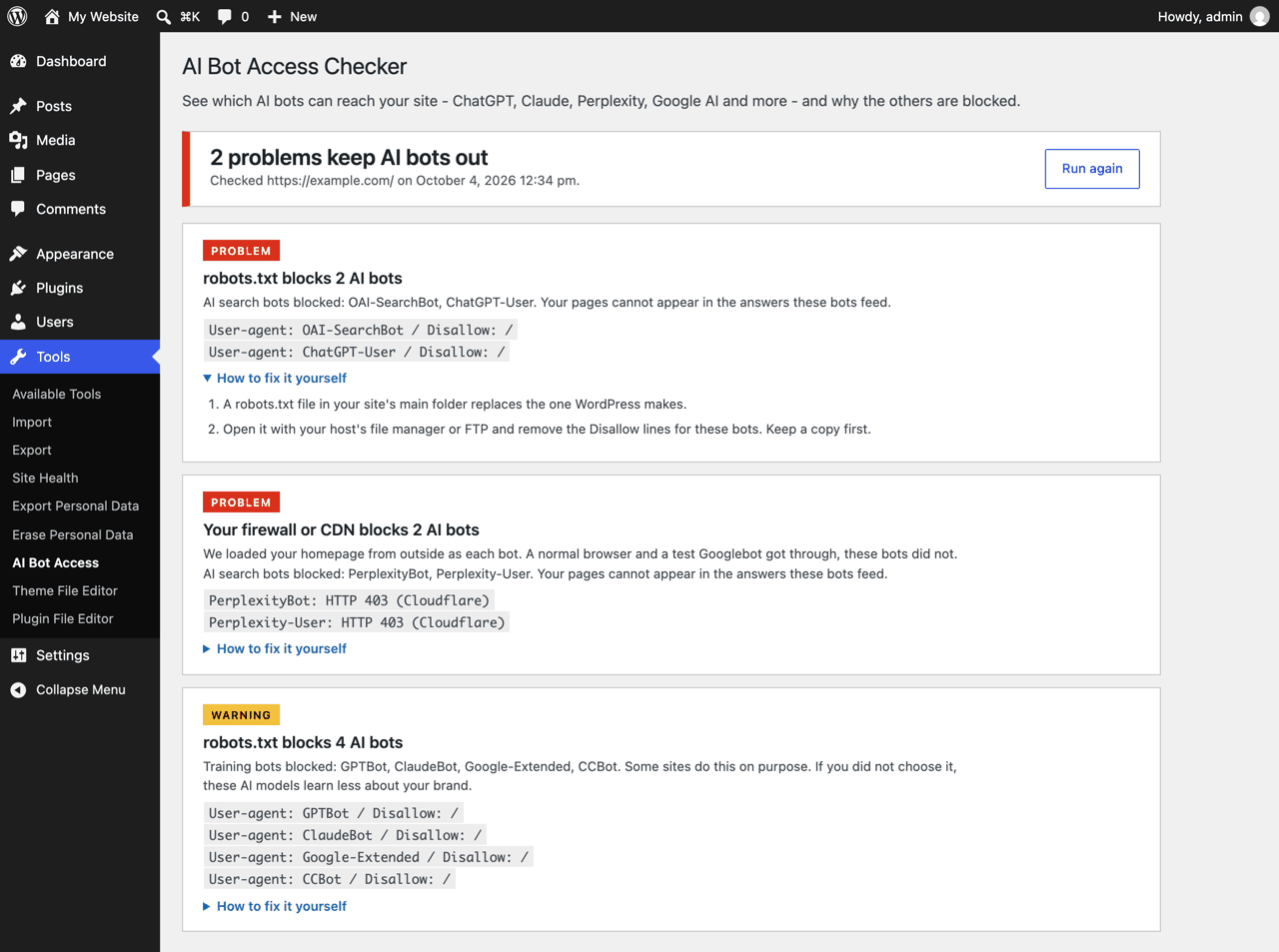
Block these and your pages cannot appear in the answers they feed.
Some sites block these on purpose. The plugin marks them as warnings, not problems.
Every problem in the report says where the block comes from and comes with plain steps to fix it yourself. Every check and every step is free, with no limits and no account.
Example from a report
Option A
The plugin is submitted to the WordPress plugin directory and under review. Once it is approved, you can install it from Plugins > Add New by searching for "AI Bot Access Checker".
Available in the plugin directory soonOption B
Download the plugin and upload it to your site. It is the same plugin that is under review.
Free and open source under GPL-2.0 or later. Works on WordPress 5.8+ and PHP 7.4+. No account needed.
No. It only reads settings and files and shows you what it found. Every fix is up to you.
That is your choice. Blocking AI search bots keeps your pages out of AI answers, which is rarely what a business wants. Training bots are different: some sites block them on purpose. The plugin marks training-bot blocks as warnings, not problems, and never changes them for you.
Some firewalls challenge every bot they cannot verify. When our test Googlebot is challenged as well, the block is not aimed at AI bots, and real AI bots crawling from their own IP addresses may still get through. The plugin says so instead of guessing.
The WordPress checks work anywhere. The outside checks need a public address. Developers can point the check at a public address with the aibac_site_url filter.
Yes. Every check and every fix-it-yourself step is free, with no limits and no account. The only paid part is optional: having the fix done for you.
When you click "Run check", only your site address goes to the checker service at aibotaccesschecker.com. It requests your public homepage and robots.txt as a browser, a test Googlebot and several AI bots, and sends the results back. Site addresses are not stored; only a daily count of checks is kept.
Your name, email, message and check results are sent only if you fill in the contact form and tick the consent box. Details: Privacy and terms.